Resource Center › Funders › NYC SBS
NYC SBS · New York City · Workforce1 centers, sector-based training and other SBS-contracted programs
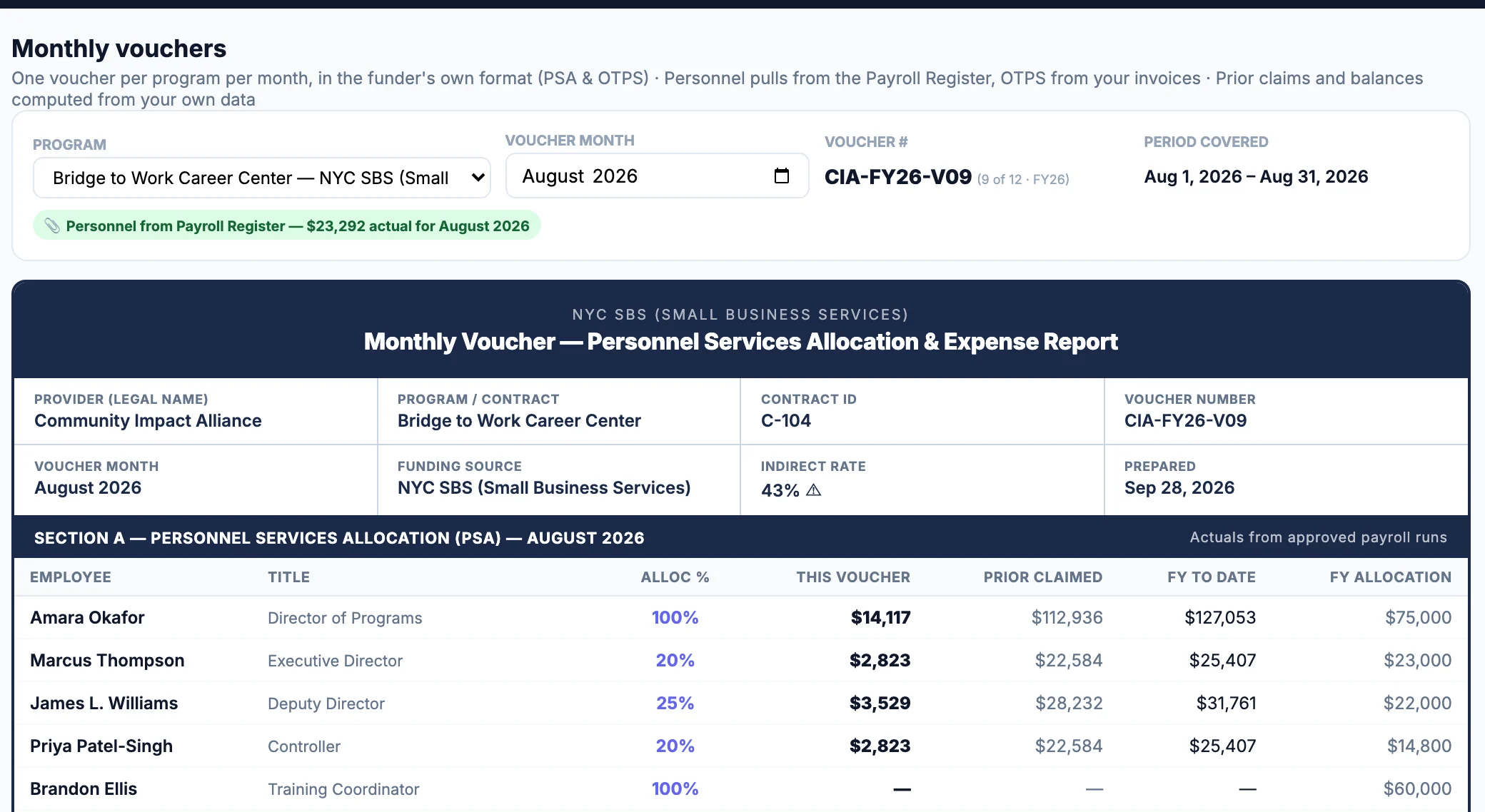
Your SBS voucher backup in SBS's own categories, with indirect capped on the reduced base.
SBS caps the Indirect Cost line at the lesser of 10% of the total annual budget — minus bonus, client transportation and stipends, equipment over $5K, incentives, rent and subcontractors over $25K — or your own calculated rate, and fringe is your own worksheet rate rather than a published cap. Prove It builds the voucher Excel from AI-read payroll and coded invoices in SBS's categories with that basis shown on the indirect line. There is no SBS-specific form export yet — the voucher Excel is the backup. You review every line before anything posts.
10 founding-pilot seats for NYC nonprofits · No card · We set it up with you on a 30-minute call
What SBS checks before it pays
Indirect is capped at 10% of a reduced base
The lesser of 10% of the annual budget — after Bonus, Client Transportation & Stipends, Equipment over $5K, Incentives, Rent and Sub-Contractors over $25K come out — or your own approved rate (SBS Fiscal Manual, Sept. 2024).
Fringe is your own worksheet rate, not a published cap
SBS computes the allowable rate from the org’s actual wage and fringe costs on its Fringe Rate Worksheet.
- SBS is a city-level WIOA-adjacent funder, distinct from NYS DOL's state-level WIOA administration — an organization can plausibly hold both a state WIOA contract and a separate SBS contract
- The indirect cap excludes six specific categories from its base; bundling any of them in gets a budget returned
- City contracts aggregating over $25,000 per year require an independent audit
- The manual's stated Single Audit tiers ($750,000 and $25,000) are pre-2024 federal thresholds — reconfirm against the current 2 CFR 200 threshold
- The full unallowable-cost list lives in the manual's Appendix B; check it directly before budgeting an edge-case cost
What Prove It does about it
Imports payroll from ADP, Paychex, Gusto, Paylocity, TriNet, QuickBooks and anything else that exports a file. Common layouts are read instantly; anything else, Claude AI finds the names, gross pay and pay date. You confirm every name before anything posts.
- Download voucher Excel (voucher number) — Four sheets — Voucher Summary, PSA (monthly), OTPS detail and Certification — laid out by this funder's own categories, from your approved payroll and coded invoices.
Coded invoices flow into the OTPS detail: the month's expenses are auto-included in this voucher, you uncheck an item to hold it for a later voucher, and earlier-dated invoices count as prior claims automatically. Categories follow SBS's own list — Rent, Equipment, Client Transportation & Stipends, Incentives, Sub-Contractors, Staff Training, Insurance.
The free voucher checker is a fixed set of rules, not AI: costs SBS's manual lists as unallowable, fringe above the 35% review threshold the app uses for SBS, allocations that don't total 100%, totals that don't reconcile, blank contract, provider or period identifiers — plus SBS's own recurring errors: Indirect is capped at 10% of a reduced base; Fringe is your own worksheet rate, not a published cap. The file is read in your browser and never uploaded. Check a SBS voucher.
Ask a CFO answers "can I charge this?" from SBS's current fiscal manual, with the source and date cited. AI guidance grounded in your live platform data, 2 CFR 200, and live lookups of current funder manuals — not legal, tax, or audit advice. Confirm consequential decisions with your funder or auditor.
Every voucher Excel carries four sheets — Voucher Summary, PSA (monthly), OTPS detail and Certification — so the backup travels with the claim, and the Print / PDF view gives you the same voucher for a signature.
SBS at a glance
Free SBS resources
Your next SBS voucher, built in Prove It — with us on the call
We're taking 10 New York nonprofits into a founding pilot. You get the full platform for 60 days at no charge, and we set it up with you: in one 30-minute working session we load your contracts, your staff and your last payroll file, then rebuild your most recent SBS voucher in SBS's own format. If it doesn't match what you filed — or catch something you missed — you've spent half an hour and owe nothing.
SBS questions
Is there an SBS form the app fills in?
Not yet. SBS vouchers come out as the four-sheet voucher Excel — Voucher Summary, PSA by month, OTPS detail, Certification — in SBS's own categories, which is the backup you attach or transcribe. If SBS has issued your program a form, send us one you've already turned in and we build it the same way as the others.
How is the SBS indirect cap calculated?
The lesser of 10% of the total annual budget, after removing bonus, client transportation and stipends, equipment over $5,000, incentives, rent and subcontractors over $25,000, or the organization's own calculated/approved rate (SBS Fiscal Manual, updated Sept. 2024). The voucher's indirect line states that basis.
What fringe rate does SBS accept?
Your own — the worksheet rate computed from your actual costs, not a published cap. The app uses a 35% review threshold for SBS so an unusually high rate gets looked at before it goes out.
Does Prove It submit my SBS voucher for me?
No. Prove It builds the voucher and the backup from your live numbers; a person on your team reviews every line and submits it the way you do today. Nothing is filed automatically, and nothing guarantees acceptance — what you get is the funder's own format, filled from the same payroll and invoices you already have, with the recurring errors flagged before you send it.
Other funders
New York City
New York State
Federal
Back to the Resource Center.