Resource Center › Funders › NYC ACS
NYC ACS · New York City · preventive services, foster care, Family Enrichment Centers and other ACS-contracted programs
Support depth: Template Support
Prove It fills ACS's Preventive Expense Report — the funder's own template — and refuses rather than leave a row or a dollar off, but it is not yet a fixture-tested export: check it against the funder's form before you file. How support depth works →
Your ACS Preventive Expense Report, from the payroll file you already have.
AI reads the payroll export, the platform builds the ACS Preventive Expense Report cover sheet and the itemized backup behind it — fringe checked against the 36% ceiling, indirect defaulting to ACS's 10% de minimis rather than the federal 15%, distorting factors kept on their own lines. You review every line before anything posts.
Plans by the number of awards and contracts you manage · View plans
What ACS checks before it pays
Distorting factors belong on their own lines
Client stipends, client transportation, incentive payments, rent, subcontracts over $25,000 and equipment over $5,000 must be budgeted separately and excluded from the indirect base.
ACS defaults indirect to 10%, not 15%
If no rate is on file, ACS applies the City's 10% de minimis — the NYC HHS Cost Manual's default for City human-services contracts — not the federal 15%.
- Fringe above 36% must be itemized in full, per ACS's own FY27 Budget Submission Guidelines
- "Distorting factors" — Client Stipends, Client Transportation, Incentive Payments, Rent, Subcontracted Services over $25,000, and Equipment over $5,000 — must be budgeted as their own line items; bundling them into the ICR base gets a budget returned
- Three written estimates for purchases over $25,000; subcontracts at or above $20,000 require ACS Responsibility Determination vetting
- Gift cards (Participant Support Costs only) are capped at $50 face value per card and $2,500 held by a custodian at once, and require a Gift Card Recipient Log plus signed Payment Acknowledgement Forms
- Cost Allocation Plans must name every shared staff title by person, with FTE percentages summing to exactly 100% across all programs
- Eligible HHS contracts get a Local Law 156 advance of 50% of the total provider budget, recouped at 10% per month starting September
What Prove It does about it
Imports payroll from ADP, Paychex, Gusto, Paylocity, TriNet, QuickBooks and anything else that exports a file. Common layouts are read instantly; anything else, Claude AI finds the names, gross pay and pay date. You confirm every name before anything posts.
- Download ACS Preventive Expense Report — ACS's own one-page Expense Report cover sheet with the monthly total, contract name, program, address, contract #, budget ID and service period from the setup card.
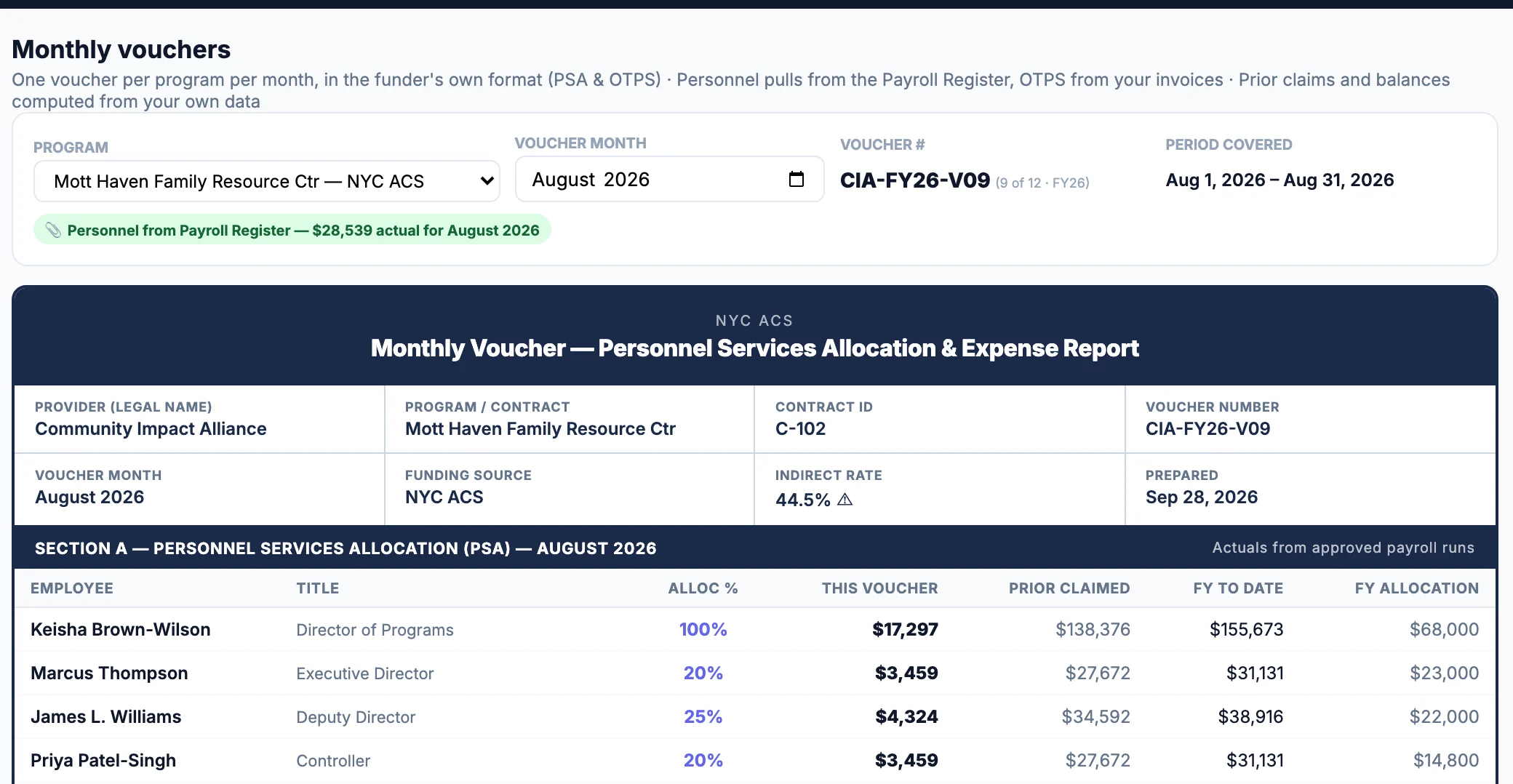
- Download voucher Excel (voucher number) — Four sheets — Voucher Summary, PSA (monthly), OTPS detail and Certification — laid out by this funder's own categories, from your approved payroll and coded invoices.
ACS cover sheet
Contract Name (Provider), Program Name, Mailing Address, Contract #, Budget ID and Fund Request for Service Period — entered once, carried onto every Expense Report.
Coded invoices flow into the OTPS detail: the month's expenses are auto-included in this voucher, you uncheck an item to hold it for a later voucher, and earlier-dated invoices count as prior claims automatically. Categories follow ACS's own list — Fees — Professional Development, Fees — Professional Fee (Other), Program Consultants, Food — Participants Only, Supplies — Office, Supplies — Program, Travel — Staff, Transportation — Participants, Equipment, Equipment Repair & Maintenance, Program Activities, Postage & Delivery, Printing & Copying, Staff Training, Telephone — Program Lines, Utilities — Program Facility, Permits & Fees.
The free voucher checker is a fixed set of rules, not AI: costs ACS's manual lists as unallowable, fringe above the 36% ceiling the app enforces for ACS, allocations that don't total 100%, totals that don't reconcile, blank contract, provider or period identifiers — plus ACS's own recurring errors: Distorting factors belong on their own lines; ACS defaults indirect to 10%, not 15%. The file is read in your browser and never uploaded. Check a ACS voucher.
Ask a CFO answers "can I charge this?" from ACS's current fiscal manual, with the source and date cited. AI guidance grounded in your live platform data, 2 CFR 200, and live lookups of current funder manuals — not legal, tax, or audit advice. Confirm consequential decisions with your funder or auditor.
Every voucher Excel carries four sheets — Voucher Summary, PSA (monthly), OTPS detail and Certification — so the backup travels with the claim, and the Print / PDF view gives you the same voucher for a signature.
ACS at a glance
Free ACS resources
Your next ACS voucher, filled into ACS's own template
Try the live demo with sample data, then choose the plan that fits the number of awards and contracts you manage. Checkout is hosted by Stripe.
ACS questions
Why does the app default ACS indirect to 10% and not 15%?
Because ACS does: budgets default to 10% de minimis if no rate is on file, and a NICRA or an Independent Accountant's Report — each valid for three fiscal years — is what raises it (ACS Division of Financial Services, FY27 Budget Submission Guidelines). The federal 15% de minimis under 2 CFR 200.414(f) is not what ACS reviews against.
What are distorting factors and where do they go?
Large one-time items that would skew the indirect base. ACS wants them on their own budget lines, not folded into a category — the line-itemizing is a Budget Builder decision you make when you set the budget up, and the checker's ACS advisory reminds you of it before you file.
Does the Expense Report replace my itemized backup?
No. It is a one-page cover sheet with a single monthly total. The voucher Excel underneath — PSA by month, OTPS detail, certification — is the itemized backup you keep and attach.
Does Prove It submit my ACS voucher for me?
No. Prove It builds the voucher and the backup from your live numbers; a person on your team reviews every line and submits it the way you do today. Nothing is filed automatically, and nothing guarantees acceptance — what you get is the funder's own template, filled from the same payroll and invoices you already have, with the recurring errors flagged — check it against the funder's form before you send it.
Other funders
New York City
New York State
Federal
Back to the Resource Center.