Resource Center › NYC DYCD › Voucher software
NYC DYCD · PASSPort · Monthly vouchers & PSA
DYCD Voucher Software for NYC Nonprofits
Prove It Financials helps government-funded nonprofits automate DYCD financial management and voucher preparation. One place for the approved budget, payroll allocations, OTPS, variances, budget modifications, monthly vouchers and closeout — built for the fiscal staff who carry DYCD contracts month to month.
10 founding-pilot seats for NYC nonprofits · No card · We set it up with you on a 30-minute call
What Prove It does for a DYCD contract
Twelve pieces of the DYCD fiscal year, each handled by a screen or export in the platform rather than a spreadsheet tab.
Approved DYCD budget tracking
Each contract's approved DYCD budget lives in Budget Builder, line by line: positions with allocation percentages, fringe at your DYCD rate, OTPS in DYCD's own item categories, and indirect on the NYC HHS Cost Manual basis. Every variance, forecast and voucher is measured against it.
Payroll and shared-staff allocations
Upload each payroll run from ADP, Paychex, Gusto, Paylocity, TriNet, QuickBooks and anything else that exports a file. Common layouts are read instantly; anything else, Claude AI finds the names, gross pay and pay date. You confirm every name before anything posts. Approved runs are split across contracts by each employee's allocation, and the Payroll Register keeps the per-contract amounts.
Salary and fringe reporting
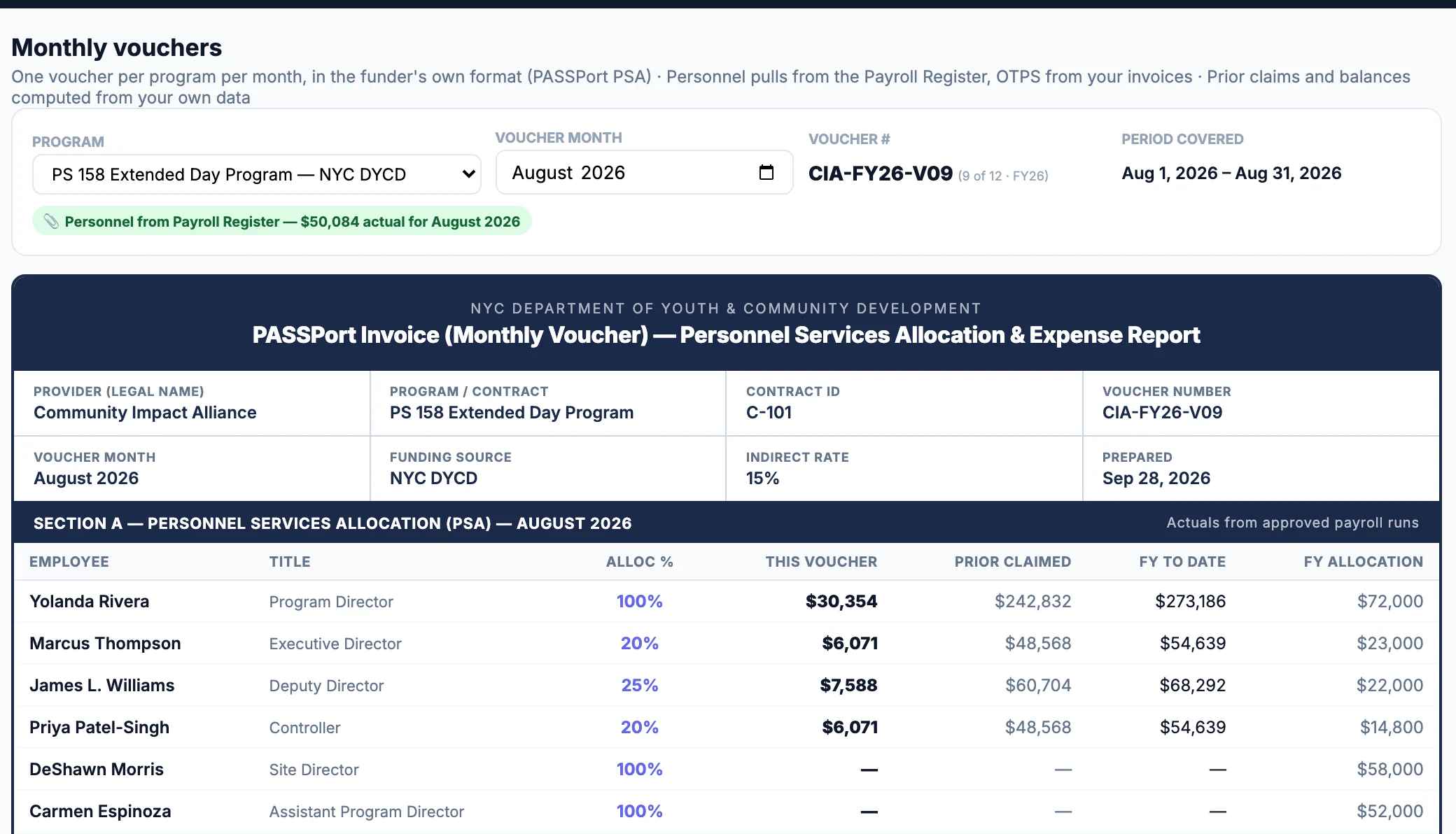
The monthly PSA sheet lists each employee's title, allocation percentage, amount this voucher, prior claims, fiscal-year-to-date and fiscal-year allocation, with fringe at your DYCD rate on the same sheet. The voucher summary carries Personnel Services and Fringe Benefits against approved budget and balance.
OTPS expense tracking
Code each vendor invoice to a DYCD PASSPort item category as it arrives. The month's expenses flow into the voucher's OTPS detail with vendor, date, category and documentation status; earlier-dated invoices count as prior claims automatically, and you can hold any item for a later voucher.
Administrative overhead tracking
Admin is an allocation bucket like any contract, so every employee's split totals 100% including admin time. Indirect is claimed on the NYC HHS Cost Manual basis — a City-approved ICR or NICRA, or the 15% de minimis default — and a written Cost Allocation Plan is generated from your Budget Builder allocations.
Budget-to-actual variance reporting
Contract Variances compares approved budget with year-to-date vouchered, pending and forecast spending for every line, prorating each contract against its own period, and flags lines running ahead of pace, projected overspend, underspend, and budgeted roles with nobody in them.
Monthly voucher preparation
One voucher per program per month in DYCD's format: a voucher summary, the PSA sheet, OTPS detail and a certification, plus DYCD's own PS Template filled from your approved payroll. Prior claims and balances are computed from your own records, not typed in.
PASSPort PSA reporting
The DYCD PS Template (Salaried, Hourly and Seasonal) comes out with each person's title code from DYCD's official list — mapped once, remembered for every voucher — and their allocation percentage. Your team reviews it and uploads it in PASSPort; the PS Template covers personnel only, and DYCD's OTPS submission is separate.
Budget modification support
A Budget Modifications tracker records each request with its category, line, from/to amounts and status (Draft, Submitted, Approved, Denied), measured against the line's own approved amount — DYCD's threshold is a move of more than 10% of that line's approved total. Scheduled quarterly reviews propose drafts from annualized actuals; creating a draft never submits anything.
Voucher reconciliation
Every voucher shows prior claims, this claim, total to date and balance per category, and the voucher, the variance table and the forecast are built from the same records. A Data Health Check looks for numbers that should reconcile and don't — it only reads — and a QuickBooks P&L import keeps year-to-date actuals tied to your books.
Contract closeout reporting
A per-contract Year-End Closeout checklist tracks the closing steps: invoices submitted through fiscal year end, checks received, expenses reconciled to submitted invoices, the final invoice, refunds of any unspent advance, funder-purchased equipment, six-year record retention and the funder's closeout package. Multi-year comparison keeps the prior years beside the current one.
Supporting-document organization
The Document Vault tracks required documents per contract with a status of on file, missing or expired. The Payroll Register, weekly timesheets for multi-contract staff, invoice attachments (flagged when missing on the OTPS detail) and the signed Cost Allocation Plan accumulate as a by-product of the monthly work rather than being assembled at audit time.
How the workflow runs
From the approved budget to the PASSPort submission, in the order the work actually happens.
- Approved DYCD Budget
Enter each contract's approved budget in Budget Builder — positions and allocation percentages, fringe, OTPS by DYCD item category, indirect. This is the yardstick every later figure is held against.
- Payroll & General Ledger
Upload each payroll run as it happens and code vendor invoices as they arrive. Import your QuickBooks P&L when you want year-to-date actuals refreshed from the books.
- Expense Allocation
Approved payroll is divided across contracts by each employee's allocation, which must total 100% including admin; each invoice carries the program and category it belongs to.
- Budget-to-Actual Review
Contract Variances shows approved budget against vouchered, pending and forecast spending by line, with the lines that are running ahead, the projected overspend and the underspend you could still redirect.
- PSA Voucher
Monthly Vouchers assembles the month: the DYCD PS Template, the PSA sheet, OTPS detail with prior claims and balances, and the certification page — all from the same records.
- PASSPort Submission
Your fiscal staff review every line, then upload the PS Template and enter the invoice in PASSPort the way they do today. Prove It does not log in to PASSPort or submit anything on your behalf.
Why DYCD Vouchering Is Difficult
None of these is hard on its own. They are hard together, every month, across several contracts, in spreadsheets that were never designed to agree with each other.
A provider with Beacon, COMPASS, SONYC and SYEP contracts files a separate monthly voucher for each, on each contract's own approved budget and period. The same payroll run and the same rent bill have to be divided among them the same way every month.
A program director who covers three sites is charged to three contracts. Each contract's PSA has to show only that contract's share of the director's pay, and the shares across all three have to add up to what the director was actually paid.
Percentages are set at budget time and drift as staffing changes. A person carried at 60% on one contract and 60% on another totals 120% — one of the most common reasons a PS schedule is returned — and every month the PSA percentages have to agree with the approved budget and the time records behind them.
Fringe is claimed as a rate on each contract's personnel total, so it has to move with salary every month and stay within the range DYCD accepts (the platform holds DYCD fringe to 8.25%–35%). A rate that differs from the approved budget is a question you will be asked.
Admin staff time, indirect costs and your approved indirect rate are three different things that often get treated as one. Admin time is an allocation like any other; indirect is claimed on the NYC HHS Cost Manual basis, and the rate on the voucher has to match the rate in the approved budget.
A March vendor bill that arrives in May belongs on a later voucher as a current claim — but it also changes the running total and the balance on every voucher after it. Kept in a spreadsheet, the prior-claims column quietly goes wrong.
When a line moves more than 10% of its own approved amount, DYCD requires a budget modification — a Purchase Order Change Request in PASSPort — and while one is pending, PASSPort blocks invoice submission until it is approved. Knowing which lines are approaching that threshold before a voucher exposes it takes a running comparison most teams have no time to maintain.
Vacancies, late starts and delayed purchases leave budget unspent, and under a cost-reimbursement contract what isn't spent isn't reimbursed. Redirecting it means noticing in month five, not month eleven.
Each voucher has to agree with the payroll register, the invoices behind it, the prior vouchers, the general ledger and the approved budget it draws down. When those live in five files, one re-run payroll or re-coded invoice puts them out of step.
How Prove It Helps
The aim is fewer spreadsheets and the same financial oversight — or better, because the oversight is built into the monthly work instead of added at the end.
Less spreadsheet work
Payroll is read from the file your provider already produces; allocation, fringe, indirect, prior claims and balances are computed rather than typed; the PS Template and the voucher package come out filled. The allocation workbook, the prior-claims tracker and the variance spreadsheet stop being separate jobs.
One set of numbers
The approved budget, the payroll register, coded invoices, the variance table, the forecast and every voucher are built from the same records, so they agree with each other by construction. Approve a payroll run or change an allocation and everything downstream updates.
Oversight stays with your team
Nothing posts, files or moves money on its own. Payroll runs wait for approval, budget-modification drafts wait for a person, and every voucher is reviewed line by line before your team submits it in PASSPort. The Data Health Check reports numbers that should reconcile and don't; it changes nothing.
An audit trail by default
The Payroll Register, weekly timesheets, invoice documentation status, a written Cost Allocation Plan and a Document Vault with on-file, missing and expired status per contract are kept as part of the monthly work, not reconstructed when the auditor or DYCD asks.
DYCD rules the platform carries
Carried in the platform's DYCD registry from the DYCD Fiscal Manual for PASSPort Users and the NYC HHS Cost Manual. Always confirm against your own contract and DYCD's current guidance.
See Prove It With One of Your DYCD Contracts
Bring your approved budget, payroll, general ledger, and most recent voucher. We'll show you how Prove It can turn them into an ongoing DYCD reporting workflow.
DYCD voucher questions
What is a DYCD voucher?
A DYCD voucher is the monthly invoice a contracted provider submits in PASSPort to be reimbursed for what it actually spent against an approved contract budget. For a typical cost-reimbursement contract it carries a Personnel Services Allocation — each employee's title, allocation percentage and pay charged to the contract for the month, plus fringe — and the month's OTPS expenses by DYCD item category, with prior claims, this claim and the remaining balance on each line. DYCD reviews it against the approved budget and its fiscal manual before paying, which is why the numbers have to tie to the payroll register and the invoices behind them.
Can Prove It create PASSPort PSA forms?
Yes. From your approved payroll it fills DYCD's own PS Template (the Salaried, Hourly and Seasonal sections) with each person's title code from DYCD's official list and their allocation percentage, and the voucher Excel includes a monthly PSA sheet alongside the voucher summary, OTPS detail and certification. You review every line and upload it in PASSPort yourself — nothing is submitted automatically. The PS Template covers personnel only; DYCD's OTPS and monthly-expense submission is separate.
Can Prove It allocate employees across multiple DYCD contracts?
Yes. Budget Builder allocates each person across contracts by percentage, and the Staff Allocation view requires every employee's allocation to total 100%, including admin. When a payroll run is approved, each person's gross pay is split by those percentages into per-contract amounts on the Payroll Register, weekly timesheets for multi-contract staff back the split, and each contract's PSA shows only its own share.
Does Prove It replace our accounting system?
No. Prove It sits alongside QuickBooks or whatever general ledger you use. It holds the contract-level view — approved budgets, allocations, vouchers, variances, forecasts and the documents behind them — and imports your QuickBooks P&L (by Class is recommended) to refresh year-to-date actuals. Your books of record, bank accounts and audit stay where they are; Prove It does not post entries to your ledger.
Can Prove It reconcile vouchers to the general ledger?
It gives you the comparison and shows the differences; a person decides what to do about them. Each voucher carries prior claims, this claim, total to date and balance per budget category, computed from your own approved payroll and coded invoices, so the voucher, the variance table and the forecast always tie to the same records. Import your QuickBooks P&L to bring the ledger's year-to-date actuals in beside them; the Data Health Check flags numbers that should reconcile and don't, and the month-end close and year-end closeout checklists include reconciling expenses to submitted invoices.
Can Prove It help with budget modifications?
Yes. The Budget Modifications tracker records each request with its category, line, from/to amounts and status — Draft, Submitted, Approved or Denied — and measures the shift against the line's own approved amount; DYCD's threshold is a move of more than 10% of that line's approved total. Scheduled quarterly reviews propose draft modifications from annualized actuals, and the Reallocation view separates overspend that could be offset by underspend on the same line in another contract from the residual that needs a formal modification. Creating a draft never submits anything: the request still goes through PASSPort as a Purchase Order Change Request and DYCD's approval.